

All-in-One WP Migration Plugin Guide
Website migration can be a daunting task, especially if you’re not comfortable diving into complex technical details. Thankfully, the All-in-One WP Migration plugin offers a simple and effective solution for WordPress users.
Whether you’re moving your website to a new host, backing up your data, or restoring your site after a mishap, this plugin provides a reliable and user-friendly approach to managing the process.
In this article, we’ll explore exactly what the All-in-One WP Migration plugin can do, its key features, a step-by-step guide to using it, and some tips to ensure a smooth migration experience.

What is the All-in-One WP Migration Plugin?
The All-in-One WP Migration plugin is a WordPress tool designed to make website migrations as seamless as possible. With this plugin, users can easily export their entire website, including themes, plugins, databases, and media files, into a single file. This file can then be imported into a new WordPress installation, simplifying the process of moving websites.
Here are some of the reasons millions of WordPress users trust it:
- A simple process for users of all skill levels – no coding or technical knowledge required.
- Full compatibility with all versions of WordPress and most hosting providers.
- Available in both free and premium versions, giving users flexibility based on their needs.
Key Features of the All-in-One WP Migration Plugin
The All-in-One WP Migration plugin shines thanks to its comprehensive features, designed to make file transfers frictionless:
1. Drag-and-Drop Functionality
The plugin’s interface lets you export or import site data with a simple drag-and-drop, without complicated steps.
2. Universal File Compatibility
Export your website into a .wpress file, ensuring it works perfectly with any WordPress installation.
3. Beginner-Friendly Interface
The plugin is incredibly easy to use, even for users who’ve never migrated a site before, while also offering advanced customisation for experts.
4. Search-and-Replace Functionality
Automatically update old URLs, file paths, or database entries during the migration process to guarantee a smooth transition.
5. Mobile-Optimized
Need to manage migrations on the go? The All-in-One WP Migration plugin is fully mobile-compatible.
6. Premium Add-ons for Added Functionality
For larger sites or more advanced needs (like multi-site support, enhanced upload limits, or additional cloud storage options), you can choose from several premium add-ons.
How to Use the All-in-One WP Migration Plugin (Step-by-Step Guide)
Ready to give it a try? Here’s a step-by-step guide to using the plugin:
Step 1: Install the Plugin
- Log in to your WordPress dashboard.
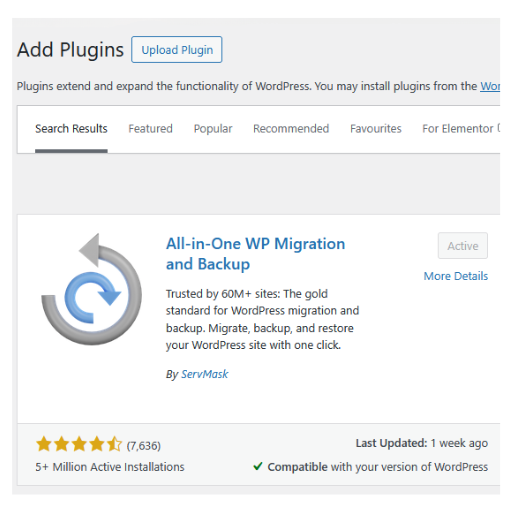
- Go to Plugins > Add New, search for “All-in-One WP Migration,” and click Install Now.
- Once installed, activate the plugin.
Step 2: Export Your Website
- Navigate to All-in-One WP Migration > Export.
- Choose the export options that suit your needs or exclude files you don’t want to transfer.
- Click Export to File to generate a .wpress file containing your entire website.

Step 3: Import the Website
- Install WordPress on your new hosting environment.
- Add the All-in-One WP Migration plugin to your new installation.
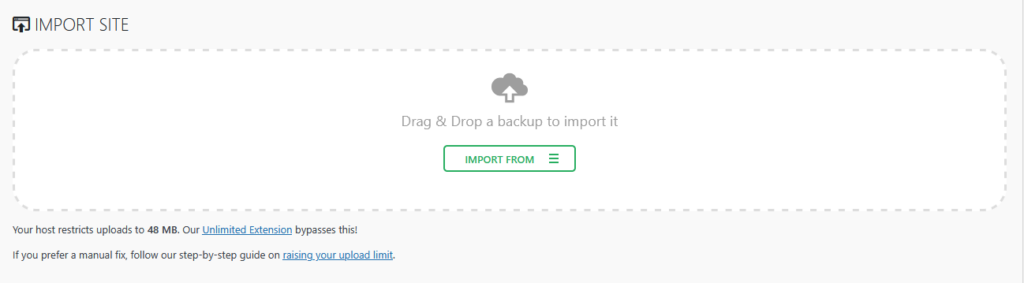
- Go to All-in-One WP Migration > Import and upload the .wpress file you exported earlier.
- After the upload is complete, your website will be restored to its original state.
Step 4: Final Adjustments
- Review your site after the import to ensure everything is working as expected.
- Update permalinks, reconfigure plugins, or address any compatibility issues if necessary.
Benefits of Using All-in-One WP Migration
The All-in-One WP Migration plugin stands out as one of the most efficient tools for moving WordPress sites. Here are some key advantages:
- Time-Saving: Eliminate hours of tedious work by seamlessly moving all your website data in minutes.
- Comprehensive Migration: Transfer everything, themes, plugins, settings, and even media files with ease.
- No Coding Required: A fantastic option for beginners or anyone who prefers to avoid manual database and FTP configuration.
- Secure Data Handling: Your exported website data is encrypted and protected during migrations, keeping your site secure.
- Regular Updates: The plugin is regularly updated to ensure compatibility with the latest versions of WordPress.
Limitations to Keep in Mind
While the All-in-One WP Migration plugin is packed with features, there are a few limitations to consider:
- The file size limit on the free version is capped at 512MB, which may not suffice for large websites.
- Some advanced features, like multi-site support or cloud integration, require purchasing premium extensions.
Occasionally, users might encounter compatibility issues with certain themes or hosting providers, though these are rare.
Tips & Best Practices for Using All-in-One WP Migration
To ensure a smooth migration experience, keep the following tips in mind:
- Backup Regularly: Use the plugin to create scheduled backups, so you’re always prepared in case of data loss or site crashes.
- Prepare Your Site: Before exporting, delete unused plugins, themes, and media files to reduce the file size.
- Check Hosting Requirements: Ensure your server has adequate PHP settings (e.g., upload limits) to handle file transfers, especially when dealing with large websites.
- Consider Premium Features: For larger websites or cloud backups, upgrading to a premium plan can save you time and eliminate frustrations.

Frequently Asked Questions
1. Can I use the All-in-One WP Migration plugin for free?
Yes, the free version is available on the WordPress plugin repository. However, it comes with limitations like a 512MB file size cap.
2. How do I increase the file upload limit?
You can edit your server’s PHP settings manually or upgrade to the premium version of the plugin to bypass these upload restrictions.
3. Is the plugin compatible with multi-site WordPress installs?
Multi-site support is available as a premium extension add-on.
4. What should I do if my imported website data doesn’t appear correctly?
Double-check your hosting settings and permalink structure. If issues persist, reach out to the All-in-One WP Migration support team.
Conclusion
When it comes to website migration, All-in-One WP Migration is a game-changing tool for WordPress users. Whether you’re moving your site, restoring a backup, or just trying to ensure your data is secure, this plugin offers a reliable, beginner-friendly solution.
With its drag-and-drop functionality, search-and-replace tools, and expansive compatibility, it’s an essential plugin for anyone managing a WordPress site. If you’re ready to simplify your migration workflow, download the All-in-One WP Migration plugin today and take the stress out of website transfers.
With a plugin this powerful yet simple to use, website migration no longer has to be a headache. If you have any questions about backing up, importing, or exporting your WordPress Website, feel free to Contact Us.


